3D 형상의 2D Projection 외곽형상 포인트 추출
3D 형상의 2D Projection 외곽형상 포인트를 추출하는 Plugin API 예제입니다.
3D 모델 외곽형상 포인트 추출
조회 중인 3D 모델의 2D Projection 외곽형상 포인트를 추출합니다.
Projection2DVO projection = Connector.Get2DProjectionVertex(
    60,     // Scale
    false,  // true: 전체 / false: 단일 폐곡선
    1       // Default
);

if (projection == null) return;

float area = projection.Area;
int vertexCount = projection.VertexCount;
BoundBoxVO vertexBbox = projection.VertexBoundBox;
BoundBoxVO nodeBbox = projection.NodeBoundBox;
string matrix = projection.Matrix;
string points = projection.Points;
string vertex = projection.Vertex;
string pathGeometry = projection.PathGeometryString;
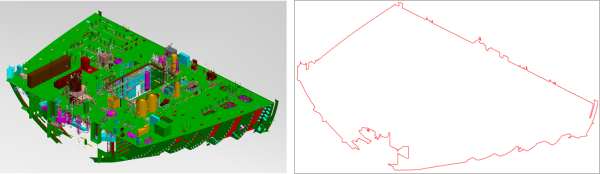
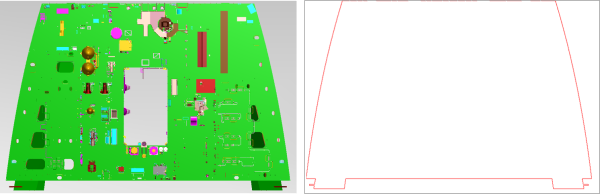
추출 결과 예시
ISO+ 방향 모델 외곽 포인트
Z+ 방향 모델 외곽 포인트
WPF를 이용한 외곽선 렌더링
PathGeometry는 WPF 클래스이며,
2D Projection 외곽선 추출 결과를 WPF 컨트롤을 사용해 렌더링할 수 있습니다.
WPF 코드 (C#)
using System;
using System.Windows;
using System.Windows.Controls;
using System.Windows.Media;
using System.Windows.Shapes;

namespace Projection2DWpfDrawControl
{
    public partial class DrawControl : UserControl
    {
        public DrawControl()
        {
            InitializeComponent();
        }

        public void DrawPathGeometry(string pathData)
        {
            MyCanvas.Children.Clear();

            if (string.IsNullOrEmpty(pathData)) return;

            Path path = new Path
            {
                Stroke = Brushes.Red,
                StrokeThickness = 1,
                Data = Geometry.Parse(pathData)
            };

            MyCanvas.Children.Add(path);
        }

        public void DrawPoints(string pointData)
        {
            MyCanvas.Children.Clear();

            if (string.IsNullOrEmpty(pointData)) return;

            string[] points = pointData.Split(',');
            string pathData = string.Empty;

            int minX = int.MaxValue;
            int minY = int.MaxValue;

            for (int i = 0; i < points.Length; i += 2)
            {
                int x = Convert.ToInt32(points[i]);
                int y = Convert.ToInt32(points[i + 1]);

                minX = Math.Min(minX, x);
                minY = Math.Min(minY, y);

                if (i == 0)
                    pathData = $"M{x},{y}";
                else if (i < points.Length - 2)
                    pathData += $" L{x},{y}";
                else
                    pathData += $" L{x},{y} Z";
            }

            TranslateTransform transform = new TranslateTransform(-minX, -minY);

            Path path = new Path
            {
                Stroke = Brushes.Red,
                StrokeThickness = 1,
                Data = Geometry.Parse(pathData),
                RenderTransform = transform
            };

            MyCanvas.Children.Add(path);
        }
    }
}
WPF XAML
<UserControl x:Class="Projection2DWpfDrawControl.DrawControl"
             xmlns="http://schemas.microsoft.com/winfx/2006/xaml/presentation"
             xmlns:x="http://schemas.microsoft.com/winfx/2006/xaml"
             xmlns:mc="http://schemas.openxmlformats.org/markup-compatibility/2006"
             xmlns:d="http://schemas.microsoft.com/expression/blend/2008"
             mc:Ignorable="d"
             d:DesignHeight="450"
             d:DesignWidth="800">

    <Canvas x:Name="MyCanvas" />
</UserControl>